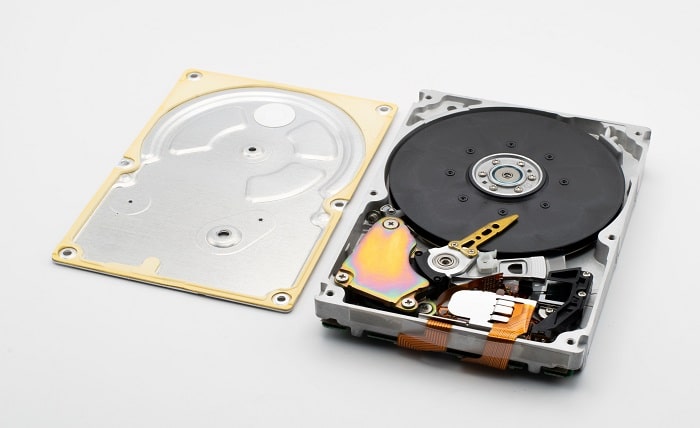
Most of the surplus drives sitting in a server room are being kept for the wrong reason. Nobody decided they were spares; they were kept “just in case,” which in practice means nobody wanted to be the person who threw out a drive the week before an array lost a disk. Drive failures are a good deal rarer than that cabinet suggests. Backblaze, which publishes failure data from its own storage fleet, reported an annualized failure rate of 1.36% for 2025, measured across 344,196 drives. On numbers like those, a site running 600 hard drives should expect something in the region of eight failures in a year, which is a long way from the forty or fifty spares that often end up stacked in anti-static bags behind a rack.
So the pile is usually bigger than it needs to be, and it is also a data risk, because a fair share of it came out of production arrays with real data still on the platters. Here is how we would triage it.
What Counts As A Surplus Server Hard Drive?
A surplus server hard drive is any drive your organization owns that is not installed in a production system and is not formally assigned as a spare for one.
In a server environment that usually covers several different kinds of stock:
- Cold spares that were bought with a system and have sat on a shelf ever since.
- Drives pulled during a hardware refresh, when the servers left but the disks were kept “for now.”
- Over-ordered stock that is still sealed in the manufacturer’s packaging.
- RMA returns (replacement drives that arrived after the problem had already been solved another way, or units that came back from the vendor and were never put into service).
- Drives from failed or rebuilt arrays, including the member disks that were swapped out during a rebuild.
- Drives removed from leased servers before the hardware went back to the lessor.
Why Do Surplus Drives Pile Up?
Mostly because no single person owns them. The refresh team moves on, the storage admin assumes procurement is tracking the spares, and procurement assumes the storage team is. After a few refreshes and RMA cycles you end up with a cabinet that nobody can describe from memory, which is exactly the condition under which a drive with data on it leaves the building in a box that was labeled “blanks.” Drives also feel valuable, and throwing out something that feels valuable is uncomfortable, which is a fine instinct as long as it turns into a decision rather than a shelf.
Start With An Inventory, Not A Decision
Before anything gets sorted, every drive should be logged. At a minimum we would record the following for each one:
- Serial number (from the label, and confirmed by reading it off the drive itself where possible)
- Manufacturer model number and, where relevant, the server vendor’s part number
- Capacity
- Interface (SAS, SATA or NVMe) and form factor (3.5 inch or 2.5 inch)
- Firmware version
- Where it came from (which host or array, and roughly when it was pulled)
- Whether it is a self-encrypting model
Then read the SMART data on every drive that will power up. SMART (Self-Monitoring, Analysis and Reporting Technology) is the health log a drive keeps about itself. The values worth looking at are power-on hours, reallocated or grown defect sector counts, pending sectors, and any logged errors (SAS and SATA drives report these somewhat differently, but the idea is the same). A drive that has been spinning for six years with a growing defect list is not the same asset as one with a few hundred hours on it, even if the labels match.
Age deserves some attention as well. In its 2025 review of failure by drive age, Backblaze found that its drives stayed under roughly 1.30% annualized failure in their first year, and that the peak in its current data was 4.25%, at about ten years and three months of age. That is a gentler curve than its older data showed, but it still tells you that older pulled drives have earned more suspicion than young ones.
The Four Piles
Once the inventory exists, the triage itself is mostly mechanical.
| Pile | How to identify it | Best route |
|---|---|---|
| Sealed new | Factory seal intact, zero power-on hours, a model that is still in use in your fleet or elsewhere | Keep a small number as fleet spares and sell the rest |
| Healthy used | Powers up, clean SMART data, moderate power-on hours, current or recent generation | Redeploy, keep as spares, or sell after sanitization |
| Questionable | Powers up but shows reallocated or pending sectors, very high hours, an old generation, or unknown history | Lower-tier reuse only if you accept the risk, otherwise sanitize and recycle |
| Failed | Will not spin up, is not detected, or fails its SMART check | Physical destruction, then recycling |
Sealed new drives
These are the easy ones, and the only real question is how many you genuinely need. A site with next-business-day vendor support and RAID 6 arrays needs fewer shelf spares than a remote site with no support contract at all. That is a judgment call, and we would make it per model rather than per cabinet (the FAQ below lists what goes into it). Anything beyond that number is surplus in the plain sense of the word.
Healthy used drives
Healthy used drives have three possible jobs. They can go back on the spare shelf, they can be redeployed somewhere less critical (a backup target, a test lab, a scratch volume), or they can be sold.
Keeping them as spares only makes sense if they will actually fit. Server vendors often ship drives with their own custom firmware, and a controller may refuse, or warn about, a drive whose firmware it does not recognize, so the same base model carrying a different vendor’s firmware may not be a drop-in replacement. Caddies matter too. A drive without the right tray for your chassis is not a spare until someone finds the tray, usually halfway through a 2 a.m. rebuild. Keep the caddy with the drive and label both.
For the rest, and for surplus sealed stock, selling is often the most sensible route. A buyer looks at what your inventory already captured: capacity, interface, enterprise versus desktop class (an enterprise helium drive line is a different item from a desktop drive of the same capacity), generation, power-on hours, and whether the drive is tested, untested or for parts.
When the pile is big enough that listing drives one by one stops making sense, Big Data Supply, an R2v3 and RIOS certified hard drive recycler, takes it as a single lot: it buys new and used SAS, SATA and server hard drives in bulk out of servers and disk arrays, prepares a quote from the list of drives you send, offers pickup instead of shipping, and provides a certificate of data destruction for each hard drive along with payment. If you need to sell used hard drives that came out of a data center rather than a desk drawer, handing the erasure step to the buyer takes one job off your team, and the serial-level inventory you already built doubles as the asset list for the quote.
Questionable drives
This is the pile that causes the most arguments. A drive with a handful of reallocated sectors may run happily for years, or it may fail during the first rebuild you ask of it. A simple rule works well here: questionable drives never go back into production and never become the designated spare for a production array. If a lab or a disposable backup copy can use them, fine. Otherwise they get sanitized and recycled, or destroyed if they will not complete an overwrite cleanly.
Failed drives
A failed drive cannot be wiped, because you cannot write to it, but the platters still hold whatever was on them when the electronics or motor gave out (which is why data recovery labs exist). Failed drives go to physical destruction (shredding or an equivalent), with the serial number recorded before and after, and the remains go to recycling.
Drives from RAID Arrays Still Hold Readable Data
There is a persistent belief that a single disk pulled from a RAID array is harmless on its own because the data is striped across several drives. Each member disk still holds stripes, though, and depending on the stripe size and RAID level, one disk can contain whole files, complete database pages, emails, or large pieces of documents that are perfectly readable. In a RAID 1 mirror, every member is a full copy. We would treat every drive pulled from an array as if it holds the entire data set.
Self-Encrypting Drives And Cryptographic Erase
A self-encrypting drive (SED) encrypts everything written to it using a key stored inside the drive. Cryptographic erase means instructing the drive to destroy that key and generate a new one, after which the old data cannot be read even though the bits are still physically on the media. It is fast, which matters when you have hundreds of drives, but confirm that the drive really is an SED (the model number should say so), that the erase command actually completed, and record the result against each serial. IEEE 2883 specifies methods for sanitizing both logical and physical storage, with technology-specific requirements, and it is a reasonable reference to point an internal erasure procedure at.
Documentation Is Part Of The Job
Whatever route a drive takes, the record should show the serial number, the route, the sanitization or destruction method, the date, and who handled it. If any of those drives held consumer report information, the FTC’s Disposal Rule expects organizations to take reasonable measures, which can include policies to “destroy or erase electronic files or media containing consumer report information so that the information cannot be read or reconstructed,” according to the FTC’s business guidance on the rule. A spreadsheet that ties every serial to a certificate or a redeployment ticket is what lets you answer an auditor in an afternoon instead of a month.
Frequently Asked Questions
How many spare drives should we keep?
There is no universal ratio. Base it on how many drives of each model you run, the failure rate you actually see in your own fleet, how fast your vendor can ship a replacement, and how much redundancy your arrays have. Recheck it at every refresh, because the right figure for a platform being retired trends toward zero.
Can we reuse drives from one vendor’s servers in another vendor’s servers?
Sometimes, but do not assume it. Vendor-specific firmware and caddies can stop a drive from being recognized or supported. Test one drive in the target system before committing to the plan.
Is a drive from a RAID 5 or RAID 6 array safe to sell without wiping it?
No. Individual member disks hold stripes that can contain complete, readable files. Sanitize or destroy every array member before it leaves your control.
Does a sealed new drive need data destruction?
No data has ever been written to it, so there is nothing to destroy. Confirm the seal is intact, log the serial number, and keep it in your records so the inventory reconciles.
What should we do with drives that will not power on?
Assume they hold data. Send them for physical destruction with serial-level documentation, then recycle what is left.